Scriptlets
Description
Scriptlets are predefined Java code snippets designed for frequently used or complex operations. In most cases, the code within these scriptlets can be modified and adapted to suit the needs of the current application. They function as transformation functions, and expects parameters as input and returns parameters.
The scriptlets can be divided in five parts:
Message collection, Message conversion, Message validation, Enterprise feature and OPCUA.
Purpose of object
They are used to perform simple data transformations without touching another system.
Creation of Scriptlet
-
Create a process model
-
Click on the + icon on the process model.
-
Scroll to the right and click on Scripts to see its content.
-
Click on the Script type you want to create.
-
Click on the icon of the script on the process model. The configuration panel will show up on the right side.
Configuration
Label and Non functional properties
See common configurations for activites
Properties
Properties can be configured in the same way as process model properties. Similar to how input, output, and local variables are defined for use across the entire process model, they must also be defined for script execution. In the first step, the variables to be used must be declared, which is done in the 'Properties' section on the ride panel. You can add all the variables needed for the process there.
Script
Here, the script used is declared.
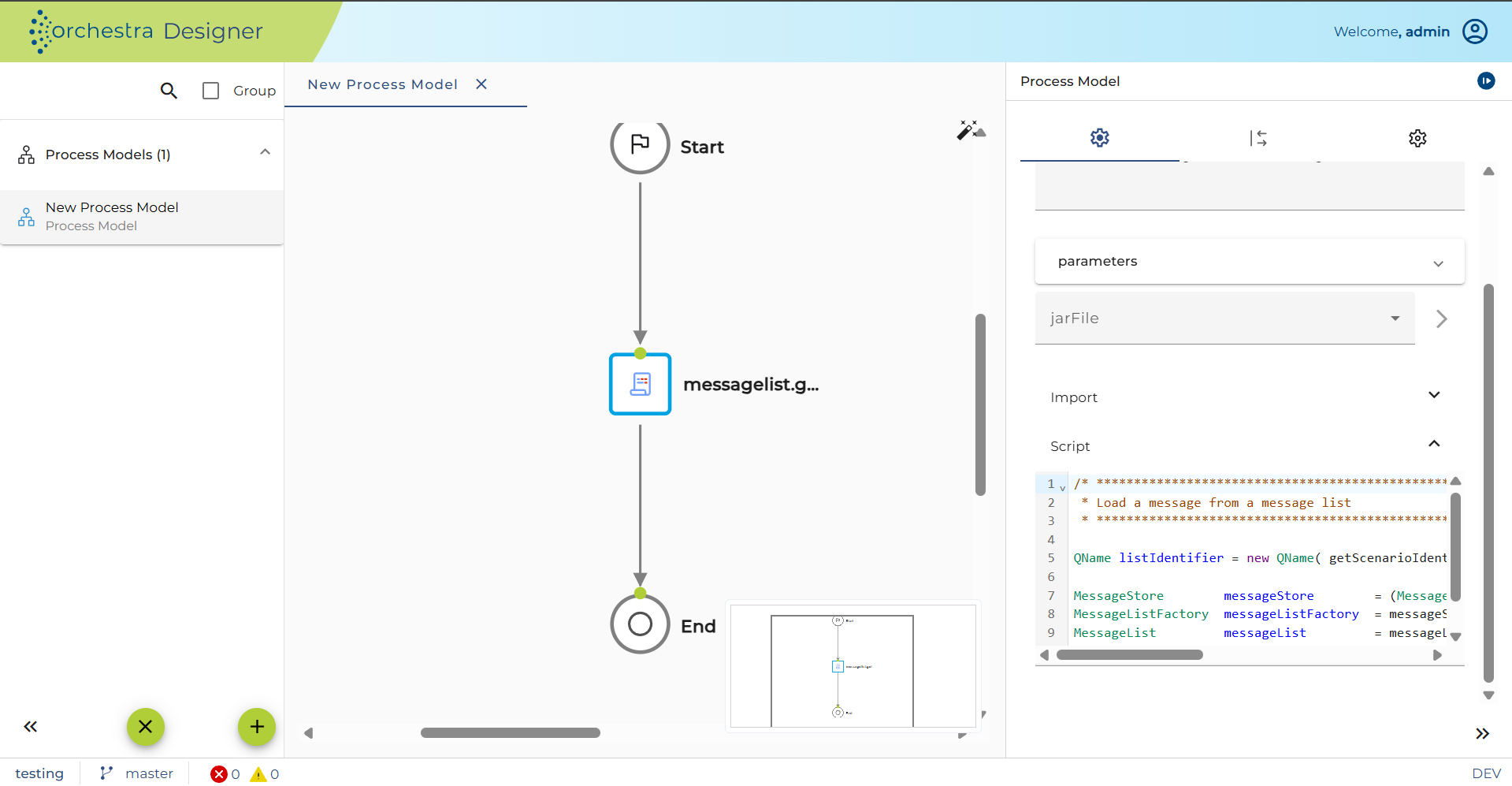
The scripts are written in programming language java. You can modify given ones or create a new one, too.
In the field below the code of the script can be changed. This field is empty if you did not choose a given script type. In the case above is an example of the script of MessageList.get.
Parameter assignment and Process variable assignment
The assignment sections define the variable connection between the script execution and process model. A script don't have to use the same naming for variables as the process model. For a correct communication this assignment of variables is done here. Usually a script needs some parameters from process model to execute. Therefor in section Parameter assignment all intended variables of the script are listed.
The other way round, after execution of the script, there may be some return values, which have to be assigned to the process variables in section process variable assignment.
To store the result you usually have to assign the main object to the CURMSG of process model.
The list of process variables can be changed in properties of the model.
The connection of variables takes place in 'Output' tab on the right panel:
-
Target: The variable name of the parameter in the target. It provides information about the target type: variable name
<data type>, short description of the intended value. -
Lang: The language of the expression. This can be either Java, XPath, or - in the case of Native JSON messages; JsonPath.
-
Expression: The variable, function, or value that will be assigned to the target variable. To get an overview of possible values, right-click on the expression field to see a selection of available content. You can insert:
-
A variable from the source, e.g.
CURMSGorMSG -
A value, e.g. string, integer, or Boolean
-
A value generated from a Java function:
-
A Boolean value indicating whether the mass data option is selected for the current message
-
A string value, which includes the name of the scenario
- See a selection of the Orchestra-generated Java functions at Java functions.
-
-
A value generated from an XPath expression using the XPath Editor.
-
A value generated from an Environment entry expression using the Environment Entry builder.
-
In field namespace context you can add or remove namespaces for Xpath expressions. This is commonly used and filled automatically, if you declare a XPath. The namespace URI of the selected record gets a prefix for potential later use.